
Automate AP, from email to ERP










Why contractors choose Agave for AP Automation
Every invoice coded, approved, and synced to your ERP
Auto-detect emails from your accounting inbox


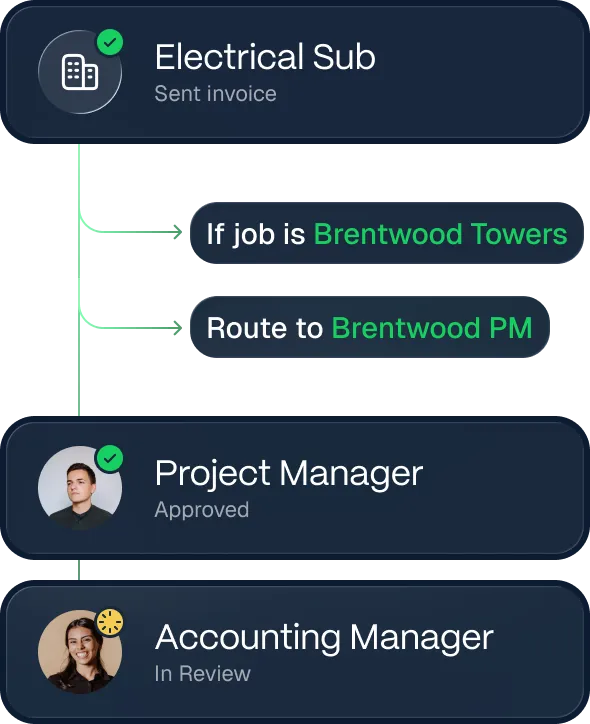
Customize approval workflows

.webp)
Built for the complexity of construction finance
Unlike generic tools, Agave handles all the messy realities of construction accounting.

Agave codes every invoice to the right job, cost type, and division so your job cost reports reflect what's actually happening in the field.

Agave codes invoices to your POs, Subcontracts, and their Change Orders and matches against them.

Give PMs edit access to cost coding on their jobs, and nothing else. Lock the rest to accounting.

One invoice from a sub can cover multiple jobs or cost codes. Agave's AI automatically splits them, routes each piece to the right approver, and posts them separately to your ERP.
Hear their story
(FPO) More than 500 companies run on Agave. See how they’re using Agave to save time, run cleaner books, and scale their businesses.

You’re in good company.
Meet the teams syncing millions of records through Agave every day.

.svg)






Up and running in days, not months


Our team configures the integration with your ERP securely, so nothing falls through the cracks.

We help configure approval workflows and test with real invoices so your team is ready for a smooth launch.

Our solutions specialist leads hands-on onboarding for your PMs, accountants, and admins.
Seamless integrations with your ERP
.webp)






Centralize your financial operations on one platform
ERP Sync

Expense Management


AI Analytics
Agave MCP
Vendor Compliance

Frequently Asked Questions
.svg)
Our AI is trained specifically on construction invoices — including subcontractor pay apps, material receipts with retention, and multi-job allocations. Accuracy improves over time as it learns your vendors and coding patterns.
Agave learns from every invoice your team processes — tracking how invoices are coded, what corrections are made, and which patterns are specific to your vendors. Over time, the suggestions get more accurate and the exceptions get fewer.
Yes. Overhead invoices are processed separately from job-costed invoices, routing to your indirect ledger accounts automatically.
Yes. AP Admins can configure field-level permissions to control exactly what each reviewer can and cannot change. Common examples: locking the Project field so PMs can't reassign an invoice, or restricting GL account edits to AP Admins only.
You choose. Some teams prefer one line item per invoice — simpler, and cleaner for owner billing. Others need one line per detected item for full quantity tracking. Agave supports both as a configurable setting so it fits how your team already works.